





















Motorola Razr Ultra 2026 Gets Android 17 Update With New AI and Display Features
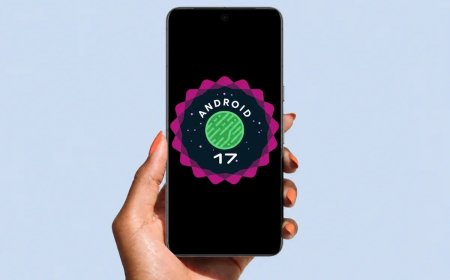
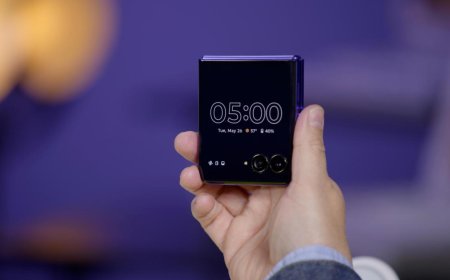
Motorola has started rolling out Android 17 to the Razr Ultra (2026) in the United States. The 4.17GB update introduces a refreshed interface, smarter notifications, new AI Key controls, notification summaries, improved HDR display settings and other usability changes. The rollout is gradual, so availability may vary by region and carrier.
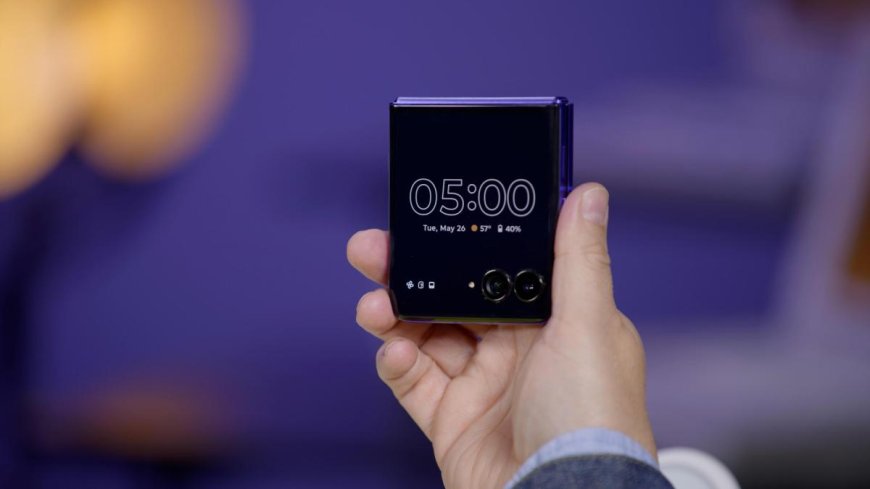
Motorola Razr Ultra 2026 Starts Receiving Android 17 With Major Interface Changes
Motorola's latest flagship flip phone is getting a significant software upgrade. The Motorola Razr Ultra (2026) has started receiving Android 17 in the United States, bringing a redesigned interface, smarter notifications and new ways to use the phone's dedicated AI Key.
The update began appearing on devices this week, with reports from October 6–8 confirming that the rollout is underway. It arrives as software version A171WLH.38-19-5 and requires a download of approximately 4.17GB. That makes it a substantial installation rather than a small maintenance patch, so users should make sure they have enough free storage and a reliable Wi-Fi connection before downloading it.
Motorola has not provided a confirmed date for every region and carrier. Owners outside the United States, including users in Bangladesh, may need to wait until the update becomes available for their particular device variant.
ANDROID 17 BRINGS A FRESH LOOK TO THE RAZR ULTRA
The update changes more than the Android version number. Motorola has refreshed parts of the interface, updated icons and reorganized elements of the Settings experience to make the software feel more modern and easier to navigate.
The redesigned interface is intended to reduce visual clutter while making commonly used controls easier to reach. Quick Settings and notification handling also receive attention as part of Motorola's broader Android 17 feature rollout.
For a foldable phone such as the Razr Ultra, these changes matter because the software experience is central to how people interact with the device throughout the day. A cleaner interface and more useful notifications can improve everyday use without requiring changes to the phone's physical hardware.
AI KEY GETS MORE FLEXIBILITY WITH MOTOROLA QIRA
One of the more practical additions is greater control over the phone's dedicated AI Key. With the new software, users can configure its double-press action to launch supported functions, including Motorola Qira and other available tools.
The change gives owners more choice over how they access AI features and shortcuts. Instead of relying on a single fixed action, users can tailor the button to fit their preferred workflow.
Motorola Qira is part of the company's wider effort to bring AI assistance into its devices. However, the functions available through Qira can depend on software version, region, language and service availability. Not every AI capability should be assumed to work identically across all markets.
SMARTER NOTIFICATIONS AND LIVE UPDATES
Android 17 also puts more emphasis on making notifications useful rather than simply increasing the number of alerts on screen.
The Razr Ultra update introduces notification summaries that can condense longer conversations into shorter recaps. For people dealing with busy group chats, this could make it easier to understand what has been discussed without opening every message individually.
The software also brings a redesigned Live Updates experience, presenting certain ongoing activities in a more prominent format. Depending on app support, these updates can help users follow time-sensitive information without repeatedly switching between applications.
Some of these features depend on compatible apps and services, so the experience may vary. Their usefulness will ultimately depend on how well developers support the new notification tools.
HDR DISPLAY SETTINGS GET A NEW CONTROL
Motorola has added a new HDR intensity adjustment, giving users more control over how brightly HDR content appears on the screen.
HDR video and images can look vivid, but intense highlights may be uncomfortable in some viewing conditions, particularly in a dark room. An intensity slider gives users another way to adjust that experience instead of relying entirely on automatic display behavior.
The update also introduces improved haptic feedback for certain interactions, including dismissing notifications. These are relatively small changes individually, but they can make the interface feel more responsive when used throughout the day.
PAUSE POINT HELPS USERS MANAGE DISTRACTIONS
Another addition is Pause Point, a feature designed to introduce a brief pause before opening selected distracting apps. The idea is to give users a moment to decide whether they actually want to open an app or return to what they were doing.
It is not a replacement for full digital-wellbeing controls, but it offers a lighter approach to managing app habits. For users who frequently open social or entertainment apps automatically, a small interruption may help them make a more deliberate choice.
The feature also reflects a wider software trend: smartphone makers are increasingly adding tools intended to help people manage attention, not just spend more time using their devices.
WHAT ABOUT SECURITY AND THE SEPTEMBER PATCH?
Motorola describes the Android 17 release as bringing security and protection improvements alongside its interface and productivity changes. However, reports on the Razr Ultra's current build indicate that it still carries the September 2026 security patch.
That distinction is important. Receiving a major Android version does not necessarily mean a device has received the newest security patch available on the day of installation. Owners should check the security patch level after updating and install subsequent maintenance releases when they become available.
The update is a meaningful software upgrade, but users should not interpret the Android version change alone as proof that every security fix released more recently is included.
HOW TO CHECK FOR ANDROID 17 ON THE RAZR ULTRA
Razr Ultra (2026) owners can check availability through the phone's software settings. Open Settings, go to System, and select System updates. Menu wording may vary slightly by software version.
If Android 17 does not appear, it does not necessarily mean the phone has been excluded. Motorola distributes updates in stages, and timing can differ according to region, carrier and device variant.
Before installing, back up important information, ensure the battery is adequately charged and connect to Wi-Fi. Because the download is around 4.17GB, downloading over a limited mobile-data connection may be inconvenient.
WHAT THE UPDATE MEANS FOR MOTOROLA OWNERS
The Razr Ultra is among the Motorola devices now receiving Android 17 as the company's wider rollout continues. Other models have also begun receiving the update, but their schedules and feature sets are not necessarily identical.
For Razr Ultra users, the main benefits are a refreshed interface, more flexible AI Key controls, smarter notifications and additional display customization. These improvements do not change the phone's hardware, but they can make a familiar device feel more capable.
The key question for users outside the initial rollout region is timing. Until Motorola publishes a region-specific schedule, owners should rely on the update screen on their own device rather than assuming that the US release means Android 17 is immediately available worldwide.
Sources
What's Your Reaction?
 Like
0
Like
0
 Dislike
0
Dislike
0
 Love
0
Love
0
 Funny
0
Funny
0
 Angry
0
Angry
0
 Sad
0
Sad
0
 Wow
0
Wow
0