

































































Meta's Muse AI Agent Moves Into Chrome With an Official Side-Panel Extension
Meta has officially launched the "Muse from Meta" Chrome extension, putting its Muse AI agent in the browser's side panel. Chief AI officer Alexandr Wang announced it on X on 20 November 2026, saying 200,000 people were already using it — a week after the listing quietly appeared in the Chrome Web Store.

Meta's Muse AI Agent Moves Into Chrome With an Official Side-Panel Extension
Meta has officially brought its Muse AI agent to Google Chrome. The "Muse from Meta" extension puts the agent in the browser's side panel, so it can work on the page you are already looking at — and it arrived with an audience already in place. Meta's chief AI officer, Alexandr Wang, announced it on X on 20 November 2026 with a post that read, in full: "muse chrome extension, available now!" He called it a "BELATED MUSE FEATURE ALERT," and added that "200,000 of you are already feeling the magic."
The announcement was belated in a literal sense. The extension had been sitting in the Chrome Web Store for about a week before Meta said anything about it. TestingCatalog first spotted the listing on 13 November, when it showed just 126 users. By the time Wang posted, that number had grown to 200,000, and the listing carried a 4.6-star rating. The store page showed version 2.1.9, updated 19 November — though the version has been moving fast, so readers should check the listing for the current one rather than taking any single number as final.
What the extension actually does
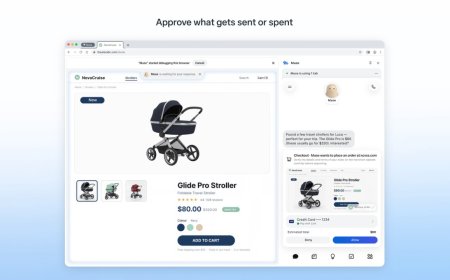
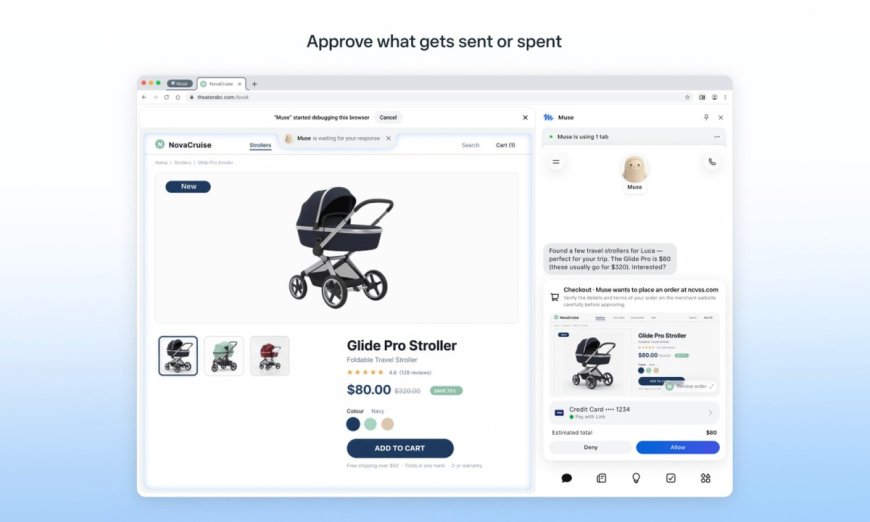
Muse is Meta's personal AI agent, a helper designed to carry out tasks rather than only answer questions. The extension brings that agent into Chrome's side panel, so you can chat with it from any page you have open without leaving the page. It opens with the Alt+Shift+C shortcut and needs Chrome 137 or later.
The store listing describes the work it is meant for in plain terms: filling out forms, comparing prices, following up on refunds, selling a car, negotiating a bill, planning and booking a trip, and tracking price drops. It can also handle shopping and travel bookings, and phone calls for paid subscribers in the US. In practice, that means you can ask Muse to do a job on the page in front of you and watch it work in the open browser window, rather than handing the task to a separate app.
Your browser, your logins
The important difference from the browser built into a Muse chat is whose browser it is. The chat browser runs on Meta's own remote system. The extension runs Muse inside your personal Chrome, using your own browser and the sites you are already signed into. That matters because a growing number of websites block agents that arrive on their own — Amazon blocked Muse outright in September — while a normal browser with a normal signed-in user gets through.
Muse opens the tabs it works in as their own tab group and can only act inside those tabs, so the rest of your browsing is untouched. And because it is working in your session, it can use any site you are logged into without asking for those login details again. That convenience is also the reason to think before installing: if there is an account you do not want Muse to use, log out of it first.
What Muse can see, and what it cannot
Meta's help pages set out the limits plainly. Muse cannot see your saved passwords, your browsing history, or your Chrome settings, and passwords on a web page are removed from the text before Muse reads it.
The trade-off is stated just as plainly. Websites Muse visits may collect information based on its activity and attribute it to you, and that activity may show up in your Google account and browsing history, and may affect the ads and recommendations you see. The store listing's own data disclosure is a broad one, covering personal information, health and financial information, authentication information, personal communications, location, web history and website content. Meta says the data is not sold to third parties and is not used for purposes unrelated to the extension's core function.
Staying in control while it works
Control is the part of the extension Meta talks about most. You approve actions before they happen — Muse does not spend, cancel or commit without your say-so — and the extension keeps a full activity log, with any connector revocable at any time. If you want to pause it mid-task, click on the page, press Esc, or move the tab out of the Muse group, and control comes straight back to you.
Meta also warns on the listing that Muse "may be inaccurate or take unexpected actions," and tells users to check in and step in when needed. That warning lands differently after a difficult week for Muse: Reuters reported on internal posts showing the agent reading encrypted messages and inventing bank balances, a story Innopark IT covered earlier. An agent that can act inside every site you are logged into has to prove it stays inside its limits, and the approval step is the main place that proof happens.
What is still unclear
Meta has not said whether the extension is available to free Muse users or only to paid subscribers, and country availability is not stated on the listing. It does require a Muse account, and it is not available in the UAE or Saudi Arabia. Support for other Chromium browsers, such as Edge or Brave, has not been confirmed either.
One thing to check before installing: the Chrome Web Store already has lookalikes with very similar names. The official extension is called "Muse from Meta," the listing says "Offered by Meta," and the developer is listed as Meta Platforms, Inc., with the contact email extensions@fb.com. Third-party extensions such as "Muse AI Companion" and "Muse AI Assistant" are not Meta's, and they should not be confused with the official one.
Muse itself is barely two months old — it launched in the US on 8 September 2026, and Meta says it has drawn 10 million users since then. The Chrome extension is the latest step in a fast expansion that has already taken it to Australia, and to a reported $300 wearable device, the Muse Charm. A sidebar agent is much easier to try than a separate app, which helps explain how the extension reached 200,000 users before Meta ever announced it. The harder part, as with any agent working inside your logged-in sessions, is trust — and that will be decided by how well the controls hold up in practice.
Sources
- i10X News, "Meta Muse Chrome Extension: AI Agent in Your Sidebar," 20 November 2026 — https://i10x.ai/news/meta-muse-chrome-extension-ai-agent-sidebar
- Digital Trends, "Meta is putting Muse in a Chrome sidebar, and the official announcement just arrived," 20 November 2026 — https://www.digitaltrends.com/computing/meta-is-putting-muse-in-a-chrome-sidebar-and-the-official-announcement-just-arrived/
- Built with Muse, "Muse Chrome Extension: How to Use Muse in Your Own Browser (2026)" — https://builtwithmuse.com/blog/muse-chrome-extension
- All Things Muse, "Wang Officially Announces Muse Chrome Extension After It Reaches 200,000 Users," 20 November 2026 — https://www.allthingsmuse.com/articles/muse-chrome-extension-official-announcement/
- tbreak, "Meta's Muse Chrome extension puts its AI in the sidebar," 20 November 2026 — https://tbreak.com/meta-muse-chrome-extension-sidebar/
- The Outpost, "Meta's Muse AI agent is now living in Chrome's sidebar, and 200,000 people are already using it" — https://theoutpost.ai/news-story/meta-s-muse-ai-agent-is-now-living-in-chrome-s-sidebar-and-200-000-people-are-already-using-it-33944/
- Innopark IT, "Meta's Muse AI Agent Hit by Early Safety Scare After Reading Encrypted Messages and Inventing Bank Balances" — https://www.innoparkit.com/meta-muse-ai-agent-safety-mishaps-encrypted-messages-november-19-2026
What's Your Reaction?
 Like
0
 Dislike
0
 Love
0
 Funny
0
 Angry
0
 Sad
0
 Wow
0