




































What Is NFC? How Tap-to-Pay, Transit Cards and Quick Pairing Work on Your Phone
NFC is the short-range wireless technology behind tap-to-pay, transit cards and one-tap pairing. This guide explains what NFC is, how it works on Android and iPhone, what it can do beyond payments, and how safe it really is.

What Is NFC? How Tap-to-Pay, Transit Cards and Quick Pairing Work on Your Phone
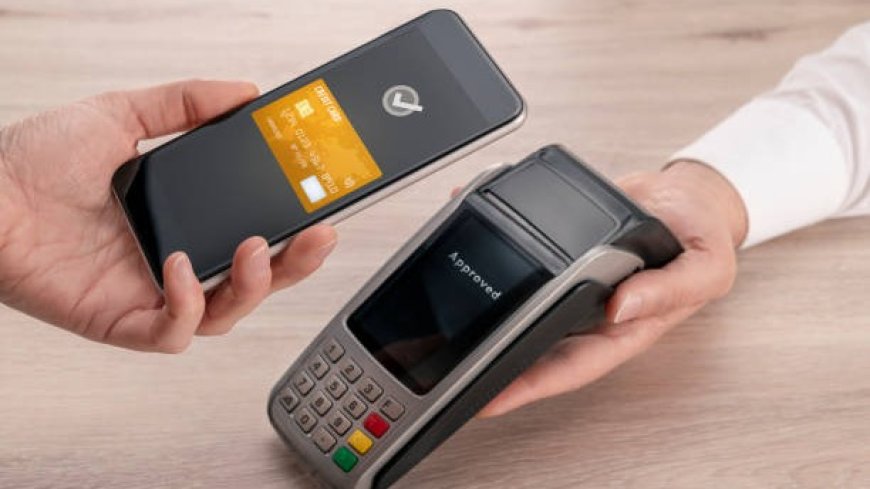
Hold your phone near a payment terminal, hear the beep, and walk away with your coffee. No card, no PIN, no fumbling for a wallet. The quiet piece of technology making that moment possible is NFC — and it does far more than pay for coffee. It unlocks hotel rooms, tops up transit cards, pairs your earbuds and turns a printed sticker into a shortcut. Here is what it is, how it works, and whether you should trust it.
What NFC actually is
NFC stands for Near Field Communication. It is a short-range wireless technology that lets two devices exchange small amounts of data when they are held very close together — usually within about 4 centimetres, and no more than roughly 10. It runs on a single radio frequency, 13.56 MHz, and is standardised by the NFC Forum, the industry body whose members include Apple, Google, Samsung and the major payment networks.
The technology grew out of RFID, the older radio-identification system used for warehouse tags and building access cards. NFC builds on two contactless standards: ISO/IEC 14443, the standard behind contactless bank cards and most payment terminals, and ISO/IEC 18092, which governs device-to-device communication. Data moves slowly by modern standards — between 106 and 848 kilobits per second — but speed was never the point. NFC is built for a quick handshake between devices that are almost touching, not for streaming.
That short range is a feature, not a limitation. Bluetooth and Wi-Fi reach across a room, which is exactly what you want for headphones and home networks. NFC is deliberately limited to near-touch distance, so a tap is an intentional act: you choose what your phone talks to, simply by moving it close.
How an NFC exchange works
Every NFC exchange has two roles. One side, the initiator, generates a radio field. The other side, the target, answers it. A passive target such as a plastic NFC tag or sticker has no battery of its own — it is powered entirely by the initiator's radio field, through a technique called inductive coupling, the same basic principle behind wireless charging.
Your phone's NFC chip can play either role, which is why the same chip can pay at a terminal, read a sticker and pair with a speaker. According to the NFC Forum and Android's developer documentation, it operates in three modes:
Reader/writer mode. Your phone acts as the reader, talking to passive tags and stickers. Tap a tag on a poster, a museum exhibit or a smart-home trigger and your phone reads the data stored on it.
Card emulation mode. Your phone pretends to be a contactless card, so a payment terminal or transit gate can read it. This is the mode behind Apple Pay and Google Wallet.
Peer-to-peer mode. Two active devices take turns generating a field and exchanging data — the way two phones used to share a photo or a contact with a tap.
Most of the structured data moved over NFC, from a tag's contents to a Bluetooth pairing handshake, is packaged using NDEF (NFC Data Exchange Format), a shared format defined by the NFC Forum so that any phone can understand what a tag is saying.
Tap to pay: what actually happens when you pay
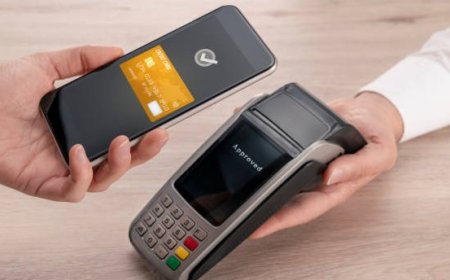
Tap to pay is the reason most people meet NFC, and the security model behind it is smarter than it looks. On iPhone it runs through Apple Pay; on Android phones through Google Wallet; on Samsung's Galaxy line it can also run through Samsung Wallet. All three work the same way at the terminal.
When you hold an unlocked, authenticated phone near a compatible terminal, three things happen in about a second. Your wallet app wakes up and identifies the active card. Instead of sending your real 16-digit card number, the phone sends a device-specific token — a substitute number tied to that one device. And the terminal and your card issuer approve the transaction using that token, together with a one-time cryptogram that is valid for that single tap and can never be reused.
Your real card number is never stored on the device and never shared with the merchant. Apple calls its substitute the Device Account Number: it lives in a dedicated Secure Element chip, is never stored on Apple's servers and is never backed up to iCloud. Google Wallet works the same way, creating a device-specific virtual account number when you add a card. Even if someone intercepted the radio signal, the token and cryptogram would be worthless after the tap ends.
There are two ways a phone can do this under the hood. The first uses a secure element, a separate certified chip that handles the transaction without the app being involved. The second, host-based card emulation (HCE), has been available on Android since version 4.4 and routes the data through the phone's processor instead. Either way, the phone will not release a payment until you have unlocked it — with a fingerprint, your face or a PIN — which is why a stolen locked phone is a poor target for tap-to-pay theft.
Look for the contactless symbol at the till — four curved lines that look like a sideways Wi-Fi icon. By now it covers the large majority of card terminals in shops, pharmacies, restaurants and supermarkets.
What else NFC can do
Payments get the attention, but NFC quietly does a lot of other jobs:
Transit. Many cities let you tap your phone or watch at the gate instead of a paper ticket or a plastic travel card, with the fare charged to the card in your wallet. The same trick works for event tickets and boarding passes stored in a wallet app.
Tags and automation. A cheap NFC sticker can trigger an action when tapped: switch your phone to silent at the office, open a Wi-Fi login page, start a playlist, or launch a smart-home scene. Android automation apps and Apple's Shortcuts app both support tag triggers.
Fast pairing. Tap a phone against a speaker, a pair of earbuds or a printer and NFC hands over the Bluetooth or Wi-Fi credentials, so the two devices connect without menus or passwords. If you have ever fought with a Bluetooth pairing that refuses to cooperate, NFC is the shortcut that skips the struggle.
Keys and access. Hotel key cards, office badges, digital car keys and some smart locks all run on the same contactless standards. A phone in a wallet app can now hold a hotel key, a car key or a transit pass alongside your bank cards.
NFC on Android vs iPhone
Almost every mainstream phone sold since the early 2010s has NFC built in — every iPhone since the iPhone 6, and nearly every Android phone from the major brands. A handful of very cheap Android models still skip it, so it is worth checking before you buy if tap-to-pay matters to you.
On Android, NFC is usually a single toggle: look in Quick Settings, or under Settings, then Connected devices. Turn it on, add a card to Google Wallet, and you are set. On iPhone there is no separate on/off switch. The NFC radio is always active for Apple Pay and for background tag reading, and Apple Pay is the only wallet that can use it for payments — a point that made headlines when Google Wallet arrived on iPhone without tap-to-pay in the United States.
To check whether your phone has NFC, the quickest test is the wallet app itself: if Apple Pay or Google Wallet lets you add a card for tap-to-pay, the chip is there and working.
Is NFC safe?
For the majority of users, yes — and in several ways it is safer than the card it replaces. A physical card can be skimmed or copied; an NFC payment sends a token and a one-time code that cannot be reused, and it needs your fingerprint, face or PIN first. Security researchers who study the technology note that the short range is itself a defence: an attacker would have to be centimetres away to even attempt to listen in, and the data they could capture would be encrypted and single-use.
That does not mean the risks are zero. The ones worth knowing about are relay attacks, where two devices pass a signal along to make a far-away card look close — a largely theoretical threat against phones, because the phone still demands authentication — and the simple risk of a stolen unlocked phone, which is why a strong screen lock matters more than any NFC setting. Contactless cards have per-transaction limits set by banks, and unusual activity can trigger a card issuer to block payments until you authenticate.
A few sensible habits cover almost everything: keep a screen lock and biometric unlock switched on, turn NFC off in settings if you never use tap-to-pay, and check your card statements regularly so a stray charge is caught quickly. There is no need for an RFID-blocking wallet for a phone — the phone's own authentication is the protection.
What is new: NFC Release 15
NFC is not standing still. In June 2025 the NFC Forum announced Release 15, the latest version of its specifications, and it became publicly available in the autumn of 2025. The headline change extends the operating volume of certified NFC connections from 0.5 centimetres to 2 centimetres — four times the range — so taps need less precise alignment and work more reliably on small devices such as wearables, smart locks and digital car keys.
Release 15 also adds support for the NFC Digital Product Passport standard, which lets a single NFC tag embedded in a product carry sustainability and product data that any phone can read. Adoption will take time — the Forum itself expects around two years for the market to fully move over — but the direction is clear: NFC is getting slightly longer reach and a bigger role beyond payments, not fading away.
NFC will not replace Bluetooth or Wi-Fi; it was never meant to. It is the handshake before the conversation — the tap that starts a payment, opens a door, or pairs two devices — and after two decades of quiet service, it is still the simplest wireless technology on your phone.
Sources
- NFC Forum announces NFC Release 15 — NFC Forum, 17 June 2025
- NFC Release 15: The what, why and how — NFC Forum, 2025
- What is NFC and how does it work? — EnvyChip
- NFC Explained: How It Works on Your Phone [2026] — Pandromeda
- What Is NFC on Your Phone? (2026) — Telecom Digest
- Tap to Pay Explained: How NFC Payments Work [2026] — Pandromeda
- NFC Security: 10 security risks you need to know — NordVPN
- Is NFC Safe? What You Need to Know About Tap-to-Pay — WhatIsMyIPAddress
What's Your Reaction?
 Like
0
 Dislike
0
 Love
0
 Funny
0
 Angry
0
 Sad
0
 Wow
0