















































How to Tell If a Phone Is Fake or Refurbished Before You Buy It
A used or refurbished phone can save you real money — or turn into an expensive mistake. This guide walks you through the checks that catch fakes, undisclosed refurbished units, locked devices and worn-out batteries before you hand over any money, from the IMEI check you can do at home to the 15-minute inspection at the meetup.

How to Tell If a Phone Is Fake or Refurbished Before You Buy It
A second-hand phone can be one of the smartest purchases you make — or one of the most expensive mistakes. A device that looks flawless in a seller's photos can turn out to be a counterfeit dressed up as a flagship, a genuine phone that was used for two years and quietly refurbished, or a handset still locked to someone else's account. The good news is that almost every one of these traps can be caught with checks that take minutes and cost nothing. The trick is knowing which checks to run, and in what order.
This guide covers the two problems buyers actually face, the checks to run before you even leave the house, and the hands-on inspection to do when the phone is in your hands. It works for iPhones and Android phones alike, whether you are buying from a shop, a marketplace listing or a stranger you met online.
The Two Problems You Are Actually Avoiding
Fake and refurbished phones are often talked about as one problem, but they are different risks with different warning signs.
A counterfeit phone is built to imitate a famous model. It may carry the right name and logo, but inside it is a cheaper device with a slower processor, less storage than advertised and a camera that disappoints the moment you take a photo. Some fakes run a modified version of Android skinned to look like iOS, which becomes obvious the moment you try to use Siri, Face ID or the App Store.
An undisclosed refurbished phone is subtler and far more common. The hardware is genuine, but it has been used, repaired and restored to look close to new — then sold as if it were factory-sealed. Nothing about the device itself is fake; the problem is honesty about its history. A phone that was already activated, repaired or fitted with a replacement battery deserves a refurbished price, not a new-phone price.
Before You Meet: Three Checks That Take Five Minutes
Most bad deals can be stopped before you leave the house.
1. Ask for the IMEI number
Every phone has a unique 15-digit IMEI number, like a fingerprint. Ask the seller to send it, or a screenshot of the About screen where it appears. On most phones you can also see it by dialling *#06# on the keypad. A seller who refuses to share it is waving a red flag — a genuine owner has nothing to hide.
2. Run the IMEI through a checker
An IMEI check tells you whether the phone has been reported lost or stolen, or blocked from mobile networks. Many checks are free: your carrier's website or app often has a device-check tool, and several countries run official verification services, such as India's Sanchar Saathi and Pakistan's PTA device verification system. You can also check the serial number through the manufacturer's own coverage page — Apple's check coverage site pulls directly from Apple's records. One honest caveat: no single check is perfect, since blacklist databases differ by country and updates can lag. Treat the IMEI check as your strongest first filter, not your only proof.
3. Ask the right questions up front
Before meeting, ask the seller in writing: is the phone fully paid off, with no financing or installment plan attached? Is it locked to a carrier? Has it ever been repaired, or had its screen or battery replaced? The answers give you something to verify in person — and a seller who dodges them has already told you something.
Meet Somewhere Public, and Never Pay a Deposit
Meet in a busy public place, ideally somewhere with Wi-Fi you can use for a quick check. Never pay a deposit or holding fee before you have held the phone. If a seller insists on advance payment or refuses a public meeting, walk away — no bargain is worth that risk.
The 15-Minute Inspection When the Phone Is in Your Hands
Match the IMEI in three places
The IMEI in Settings should match the number printed on the box and, on many phones, on the SIM tray or the back panel. If the serial number on the box does not match the one in Settings, the phone was repackaged — almost certainly refurbished or replaced. This is one of the most reliable signs of an undisclosed refurbished unit.
Read the model number, not just the name
The name shown in Settings is just text and can be changed, so compare what the phone actually has against the real specifications of the model: processor, memory, storage options, screen size and number of cameras. Counterfeits often show the right name with the wrong processor, much smaller storage or fewer cameras. Fake storage is a common trick — the phone reports 256 GB, but data written past a few gigabytes is lost. Only writing data and reading it back proves the real size.
On an iPhone, the model number itself tells a story. Apple uses a prefix system: a model number starting with M means a brand-new retail unit, F means refurbished by Apple, N means a replacement device issued under warranty, and P means a personalised or engraved unit. You can find it under Settings, then General, then About — tap the model number once to reveal the full code.
Check for account locks first
This is the most important step of all. A phone still signed in to the seller's Google account will ask for that account after a factory reset, and you will not be able to use it. Ask the seller to remove their Google account and the manufacturer's account, such as a Samsung account, and then reset the phone in front of you. On an iPhone, watch for Activation Lock behaviour during setup — anything unusual there points to a device with an unclear ownership history. Walk away from any phone that shows a company management message or a locked bootloader warning the seller cannot explain.
Inspect the body in good light
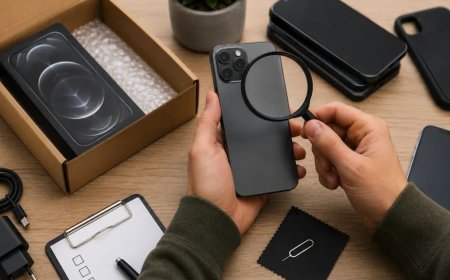
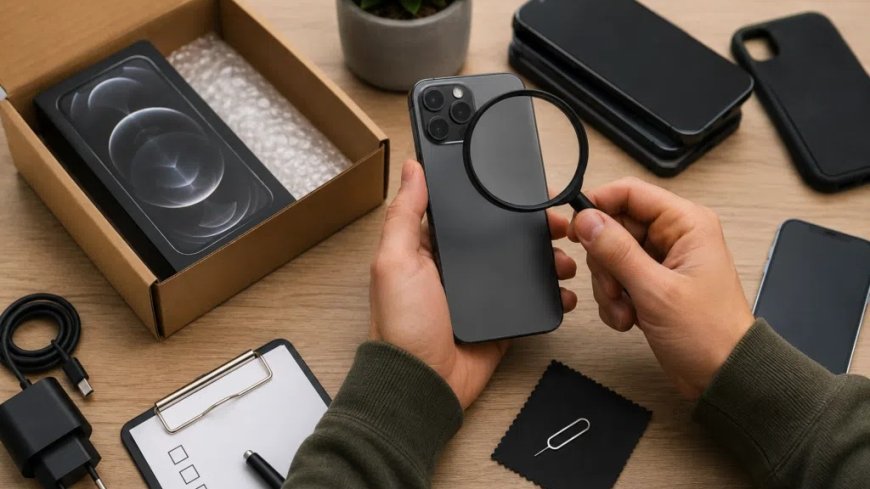
Look along the edges for gaps, uneven glue or a screen that sits higher on one side — all signs the phone has been opened. Damaged screw heads and rough edges around the frame point to a repair. A screen or back panel that lifts, or a warm bulge in the body, can mean a swollen battery: do not buy it. On a sealed-box purchase, check the packaging too — original boxes have high-quality printing, correct colours and official stickers, while accessories such as chargers carry proper brand markings and quality cables. Fake phones are often noticeably lighter than the real model.
Test the screen properly
Open full-screen white, black, red, green and blue images at full brightness. Look for dead or stuck pixels, lines, a yellow or pink tint, bright patches near the edges, and the ghost of a keyboard or status bar on a grey background — that burn-in is common on older OLED screens and a sign of heavy prior use.
Check the battery's real condition
Battery health is one of the most reliable indicators of a phone's true age. On an iPhone, go to Settings, then Battery, then Battery Health and Charging. Anything below 100 percent on a phone sold as new means it has been used — regardless of how sealed the box looks. Below about 80 percent of its original capacity, a battery holds noticeably less charge. Watch the charge level during a few minutes of heavy use: a sudden drop of several percent, or a phone that switches off above zero, means the battery is worn out.
Test the software and the features
Confirm the phone is genuinely running the software it claims. On a supposed iPhone, test Siri, try setting up Face ID and open the App Store — a counterfeit running a disguised Android build fails these tests immediately. Check that the fingerprint sensor, NFC and other advertised features actually work, and look through the settings menu for missing or incomplete sections, which are common on fakes. A quick benchmark app can also help: compare the score against the official score for that model, since counterfeits score far below the real thing.
Reading the Price and the Seller
Refurbished phones are usually graded, and the grade should match the price. A like-new Grade A device with no visible scratches and original parts typically sells for 75 to 85 percent of the retail price, while a Grade B device with minor cosmetic marks goes for 60 to 75 percent, and a Grade C device with visible wear for 45 to 60 percent. A manufacturer-refurbished phone — restored by Apple or Samsung with a new battery and outer shell — usually commands 80 to 90 percent of retail. If a "brand new" flagship is offered at half price, the price itself is the warning.
Buy from sellers who welcome inspection. A shop or seller that lets you run every check above, answers questions in writing and offers a short return window is taking the same care you are. A seller who rushes you, refuses the IMEI or insists on payment before inspection is not.
Why This Matters
A phone is not a small purchase, and in many countries it is also the device that holds your banking, your photos and your identity. Ten minutes of checking before you buy can save you months of frustration with a handset that drops calls, dies by lunchtime or locks you out entirely. The checks in this guide cost nothing, need no special tools and work whether you are buying a flagship iPhone or a budget Android phone. Use them every time — the phone that passes them all is the one worth your money.
Sources
- Verimei — How to Check If a Phone Is Refurbished or Original: 7 Methods (2026)
- FinancialContent — How to Avoid Fake and Refurbished iPhones in Bangladesh
- Medium — Used Phone Buying Guide: 15-Minute Scam Check
- Mobile.com.bd — How to Spot a Fake Used Phone in Bangladesh
- How to Check a Used Phone Before You Buy It — 14-Step Checklist
What's Your Reaction?
 Like
0
 Dislike
0
 Love
0
 Funny
0
 Angry
0
 Sad
0
 Wow
0