







































































Lumo Desktop Arrives: Proton's Privacy-First AI Assistant Now Works on Your Files and Apps
Proton has launched Lumo Desktop for Windows, macOS and Linux, turning its privacy-focused AI assistant into an agent that can work with local files and connected apps. The release adds Connectors, Schedules and Skills, with per-action permission controls and a promise that conversations are never used to train AI models or serve personalised ads.
Lumo Desktop Arrives: Proton's Privacy-First AI Assistant Now Works on Your Files and Apps
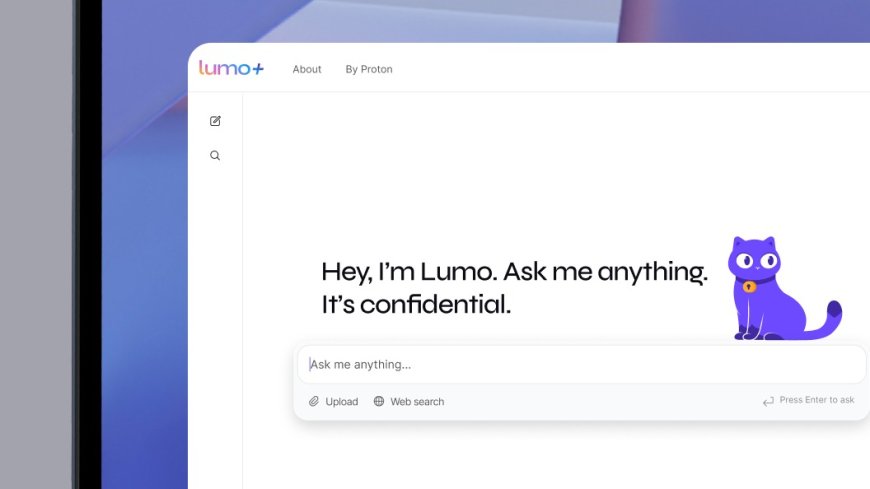
Proton has taken its AI assistant off the browser and onto the desktop. Lumo Desktop, launched on Tuesday, November 17, 2026, is now available for Windows, macOS and Linux, and it turns Lumo from a chatbot that answers questions into an assistant that can work with your files, connect to your apps and run tasks on a schedule.
The move comes as AI assistants everywhere shift from answering prompts to acting on behalf of their users. The difference Proton is betting on is control: Lumo Desktop is built around the idea that an AI agent should only touch your data with your permission, and never use what it sees to train models or target advertising.
Connectors, Schedules and Skills
The desktop release arrives with three new systems that work together. Connectors let Lumo reach into the tools you already use. Schedules let it run tasks at set times. Skills let it remember how you want work done.
Through Connectors, Lumo can access local tools such as the file system, shell execution and browser content, as well as Proton Mail through Proton Mail Bridge and third-party services including Google Drive, Dropbox, Confluence and Jira. It also supports local and remote Model Context Protocol (MCP) servers, the standard AI agents use to reach external data sources.
For each connector, users decide which actions Lumo can run automatically, which ones need approval first, and which are blocked entirely. Someone might let Lumo search their inbox freely, require approval before it sends an email, and block it from deleting messages altogether. Individual tools can also be switched off for a single conversation from the Tools menu.
Tasks on a timetable, instructions that stick
Schedules let users ask Lumo to run a task at a specific time or repeat it regularly, such as a weekly summary of the inbox, a monthly review of spending, or updates on a topic they are following. Each scheduled task carries its own permissions, so users choose what it may handle on its own and what still needs a sign-off. Tasks can be paused, edited or deleted at any time.
Skills save instructions, templates and reference files that Lumo can reuse across conversations. A writing Skill can keep emails sounding like their author, while saved career details can help tailor job applications and dietary preferences can shape meal plans. Lumo applies relevant Skills automatically and can use several in the same conversation. An earlier feature, Custom Lumos, is being migrated to the new Skills format.
Proton gives everyday examples of the three systems working together: asking Lumo to review bills and receipts in local folders and Google Drive, flag unusual charges and schedule a monthly review in a preferred format; or gathering tickets and reservations from email into one travel itinerary while a Skill remembers the traveller's preferences.
Privacy is the selling point
The privacy claims are central to the launch. Proton says Lumo never uses conversations or information from connected apps and files to train models or serve personalised ads. Chat history is protected with zero-access encryption, meaning no one but the user can read it, not even Proton. The company says it keeps no server-side logs, and the limited data it does store is protected under Swiss privacy law and hosted on European infrastructure, outside the scope of the US CLOUD Act.
The timing is pointed. Apple announced this same week that it was tightening security settings for apps requesting Full Disk Access, the permission AI desktop apps typically need, after concerns about how much personal data such apps can reach. Proton's answer is to give users a permission switch for every action instead of an all-or-nothing grant.
Lumo launched as a web chatbot in July 2025, and a larger update months ago added new Lite and Max models, memory across conversations, image generation and an interactive editing canvas. The desktop release is the first step in Proton's pledge, made in late October, to share the AI tools it builds for its own staff, with the source code published so the community can inspect how they work.
New hardware behind the assistant
Proton is also investing in the infrastructure behind Lumo. Its first Nvidia B300 cluster, built on Open Compute Project standards, is now going live in Switzerland, which the company describes as a significant investment in sovereign Swiss AI infrastructure that gives it greater control over the technology powering its services.
Lumo Desktop is available to download now for Windows, macOS and Linux, and requires a Proton account. Once signed in, users connect apps and files or create their first Skill from the Customize section of the sidebar, and set up recurring tasks from Schedules.
The launch lands in a week when AI agents are pulling in opposite directions: OpenAI has just given ChatGPT a wallet so its agents can shop and check out for users, while United Airlines has barred AI agents from booking flights, citing cybersecurity risks. Proton is staking its claim in the middle ground, an agent that can act, but only within limits its user sets.
Sources
- TechCrunch — Proton's Lumo, a privacy-focused alternative to ChatGPT and Claude, arrives on desktop
- Proton Blog — Proton launches Lumo Desktop, bringing connectivity and automation to privacy-first AI
- Neowin — Proton announces Lumo desktop apps for Windows, macOS, and Linux
Related reading: ChatGPT Wallet lets OpenAI's AI agents shop and pay for you and United Airlines bars AI agents from booking flights.
What's Your Reaction?
 Like
0
 Dislike
0
 Love
0
 Funny
0
 Angry
0
 Sad
0
 Wow
0